 QDev
QDevGUIDE · THEMES
Make the viewer yours.
QDev ships nine light and dark themes and can import your own VS Code theme. Pick one and it's remembered across every file — syntax colors, chrome, and all four views.
Setting a theme
- 1Click the gear icon in the viewer to open Settings.
- 2Switch to the Appearance tab.
- 3Hover a theme card to preview it live, then click to apply it.
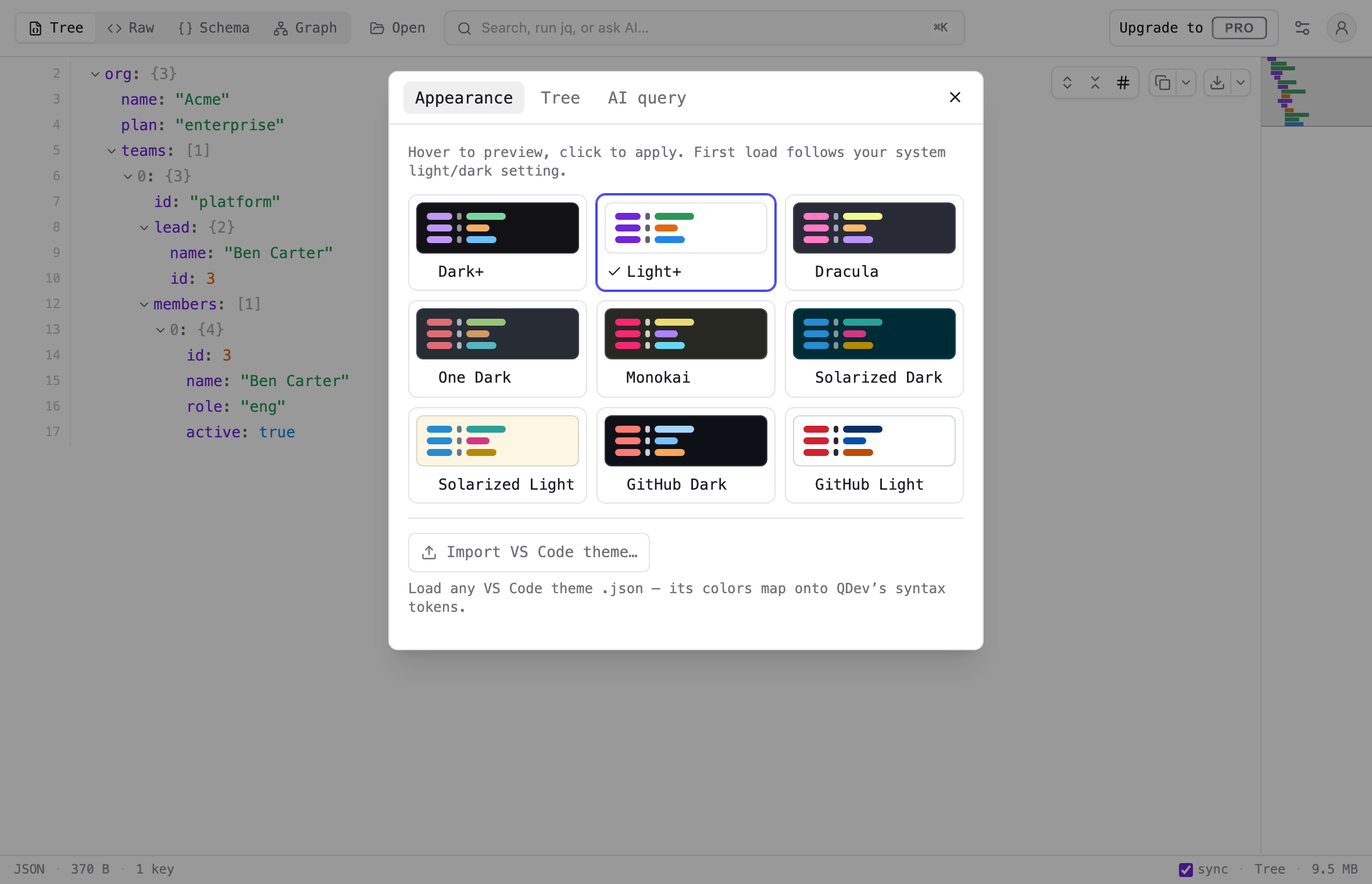
The built-in themes
Six dark and three light, each mapping a familiar editor palette down to QDev's JSON syntax colors — keys, strings, numbers, booleans, nulls, and brackets.
DARK
Dark+
Dracula
One Dark
Monokai
Solarized Dark
GitHub Dark
LIGHT
Light+
Solarized Light
GitHub Light
Bring your own VS Code theme
Already have an editor theme you love? Use Import VS Code theme… on the Appearance tab to load its JSON. QDev maps the editor palette onto its six JSON syntax tokens and adds it as a card alongside the presets — removable whenever you like.
Find your palette.
Nine themes, your own VS Code theme, and a choice that sticks.